
How Care Journal works
Here’s what actually happens.
The first week with Care Journal, start to finish. Six steps, about five minutes of your time, and most of it is just talking.
Seven languages. Voice or text. Ready in about a minute, and you decide who ever sees it.
Scroll
The first minute is the whole setup.
Download it, open it, and talk. It works on its own from the first minute, and you can decide later whether to keep it.
Open it and speak
Speak first, sign up later, once you know you want to keep what you said.
Bring things in later
Records, photos and health data can follow whenever you feel like it.
Start on your own
Your clinic carries on exactly as it is. Tell them whenever you like.
- 01
Open the app
Works before you make an account.
- 02
Record a visit
Or simply say how you feel.
- 03
See it in plain language
A summary you can actually read.
- 04
Check in between visits
A quick note keeps the picture current.
- 05
Ask anything
Explain a result, or what changed.
- 06
Bring your people in
Share only what you choose.
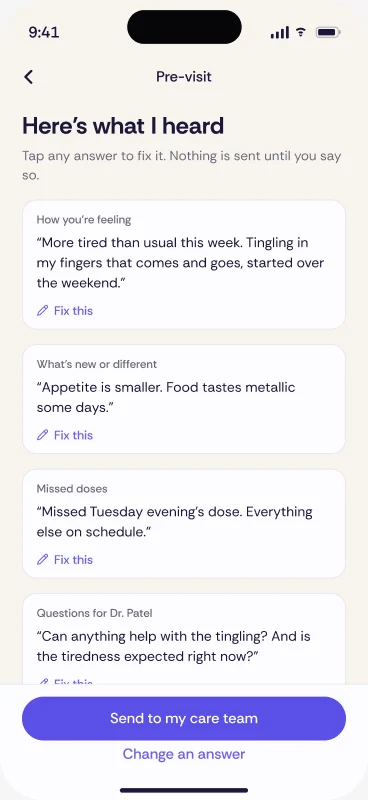
Your first appointment with it.
Start it in the waiting room and put your phone face down on the table. It keeps going through the whole conversation, and the summary lands minutes after you leave.
You stay present
You can listen and ask the things you meant to ask, while it does the writing.
It hears all of it
Including the part at the end, when the doctor is already halfway to the door.
You read it later
On the drive home, and again next week when you need to remember what was said.

Then it asks, now and then.
A short check-in when something changes, thirty seconds by voice. On the quiet days it leaves you alone.
Say what changed
Speak for a few seconds and it files itself, dated to the day it happened.
Photograph anything
A rash, a new box of tablets, a letter that came in the post.
It fills in the rest
Sleep, weight and activity arrive on their own from Apple Health or Health Connect.
A month in, you have something real.
Every visit written up, every check-in dated, your records gathered, and a picture of how the weeks actually went. It would have taken a notebook and a filing cabinet to keep.
A clear history
What happened and when, in the words you used at the time.
Ready before you go
Your questions and what changed, on one page, the morning of your appointment.
Yours to share
Send a summary to your doctor, or your daughter, or keep it entirely to yourself.
The practical questions.
The ones people ask once they have decided to try it.
Do I have to tell my doctor I am recording?
Yes, and most people just say it plainly. Recording a visit for your own memory is normal and clinicians are used to being asked. If anyone would rather you did not, you can type instead.
What if I forget to start it?
Start it partway through and it keeps whatever is left. A half visit written down is still better than the drive home trying to remember it.
How long does a summary take?
A few minutes after you stop recording. It is usually there before you get to the car park.
Do I have to check in every day?
No. Speak when something changes and skip the days it does not. Nothing nags you, and gaps are fine.
Can I fix it if it gets something wrong?
Yes. Every entry and every summary can be edited, and anything you delete is gone for good.
What happens if I stop using it?
Everything stays yours. You can come back to it, export it, or delete the whole record whenever you decide.
That’s the whole thing.
Free for patients and families. Encrypted on your phone. No subscriptions, no ads, no card.